JobLine G-Code Intelligence
Simulate and review CNC programs in VS Code before they reach the machine. A 3D toolpath simulator and a code review that flags problems on the line that causes them — for Fanuc, Haas, Siemens, Mazak and Okuma, plus Fanuc Robot TP and ABB RAPID. Free to install. No account required.
Or press Ctrl+P in VS Code and run: ext install WeCr8-Solutions.jobline-gcode
Runs locally. Your programs are never uploaded.
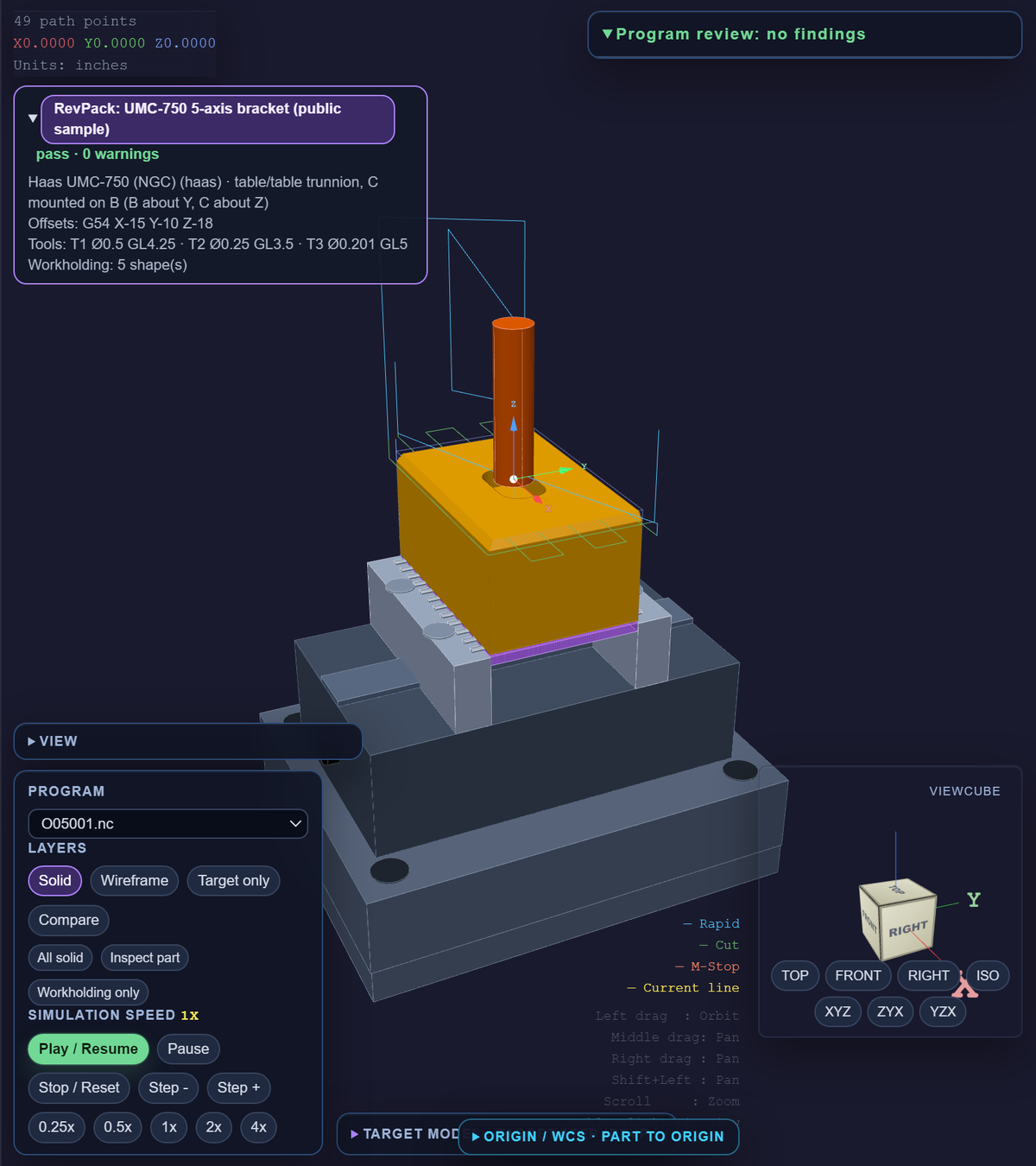
See the program run against the setup
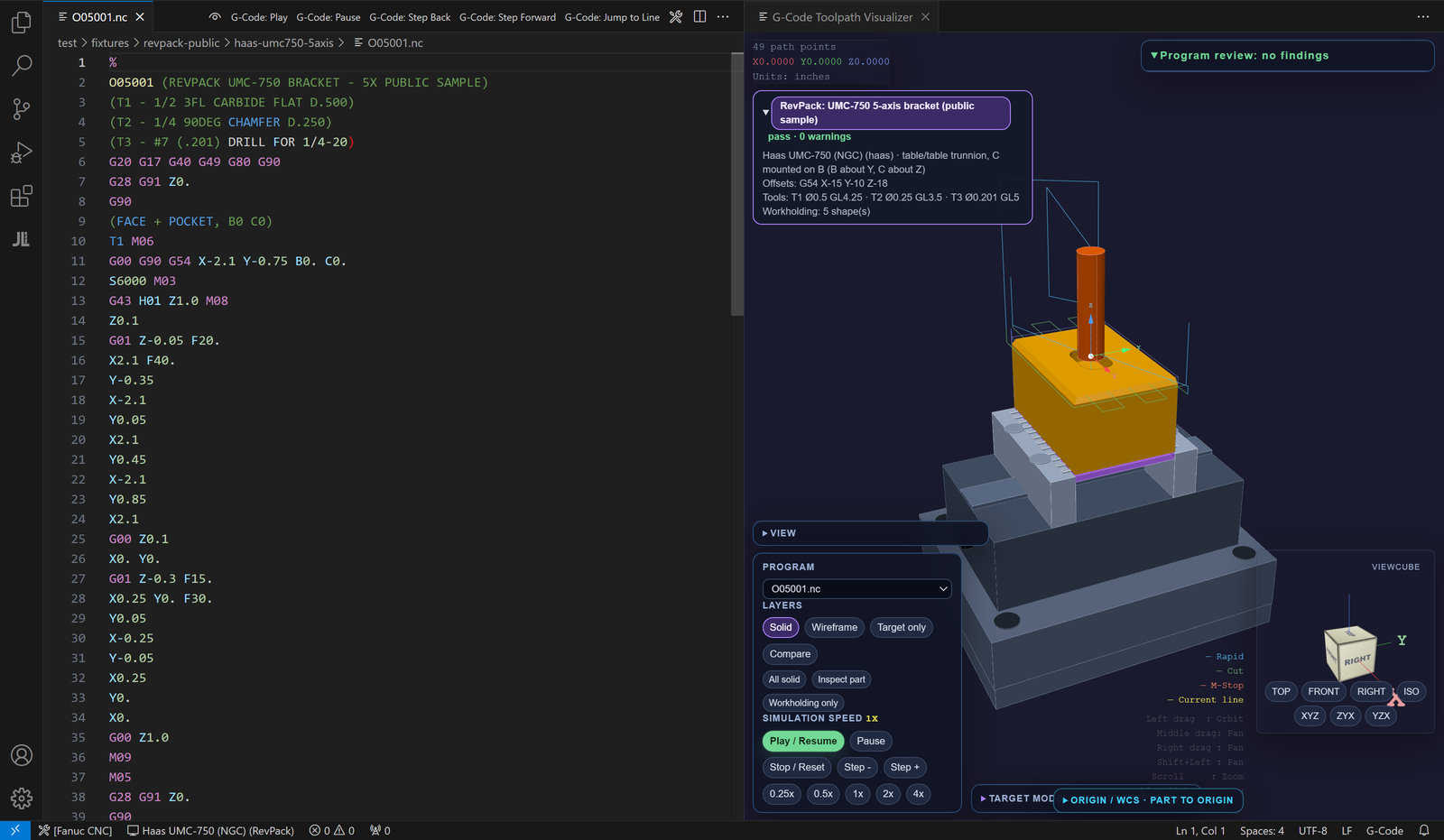
The visualizer draws every move against the stock, the workholding and the finished part, so you can see what the tool will touch before you prove out the program at the machine. It is a review aid, not collision certification.
Play, pause, step and speed
Play / Resume, Pause, Stop / Reset, Step - and Step +, at 0.25x to 4x. The current line is highlighted in the editor as the tool moves.
Toolpath, stock, tool and jaws
G00–G03 in G17/G18/G19, G20/G21, G90/G91, with rapids and feeds drawn differently. Box or bar stock, ISO insert-aware mill and lathe tools, fixtures and jaws.
Import the finished part
Load the target part as STL, tessellated STEP (bundled OpenCascade) or Fusion 360 F3D setup data, and see it against the toolpath.
The real vise: body, jaws, stock and part
v0.3.14 · in reviewRevPack setups draw a LANG Makro-Grip 77 5-axis vise on a Quick-Point plate and riser, with a 3 mm grip on a pre-stamped blank. The vise body, each serrated jaw, the plate, the riser, the stock and the finished part are separate solids.
Solid, Transparent or Wireframe, per object
v0.3.14 · in reviewSet the stock, target, vise body, jaws, zero-point, tool, holder and toolpath separately, with opacity. Presets: All solid, Inspect part and Workholding only.
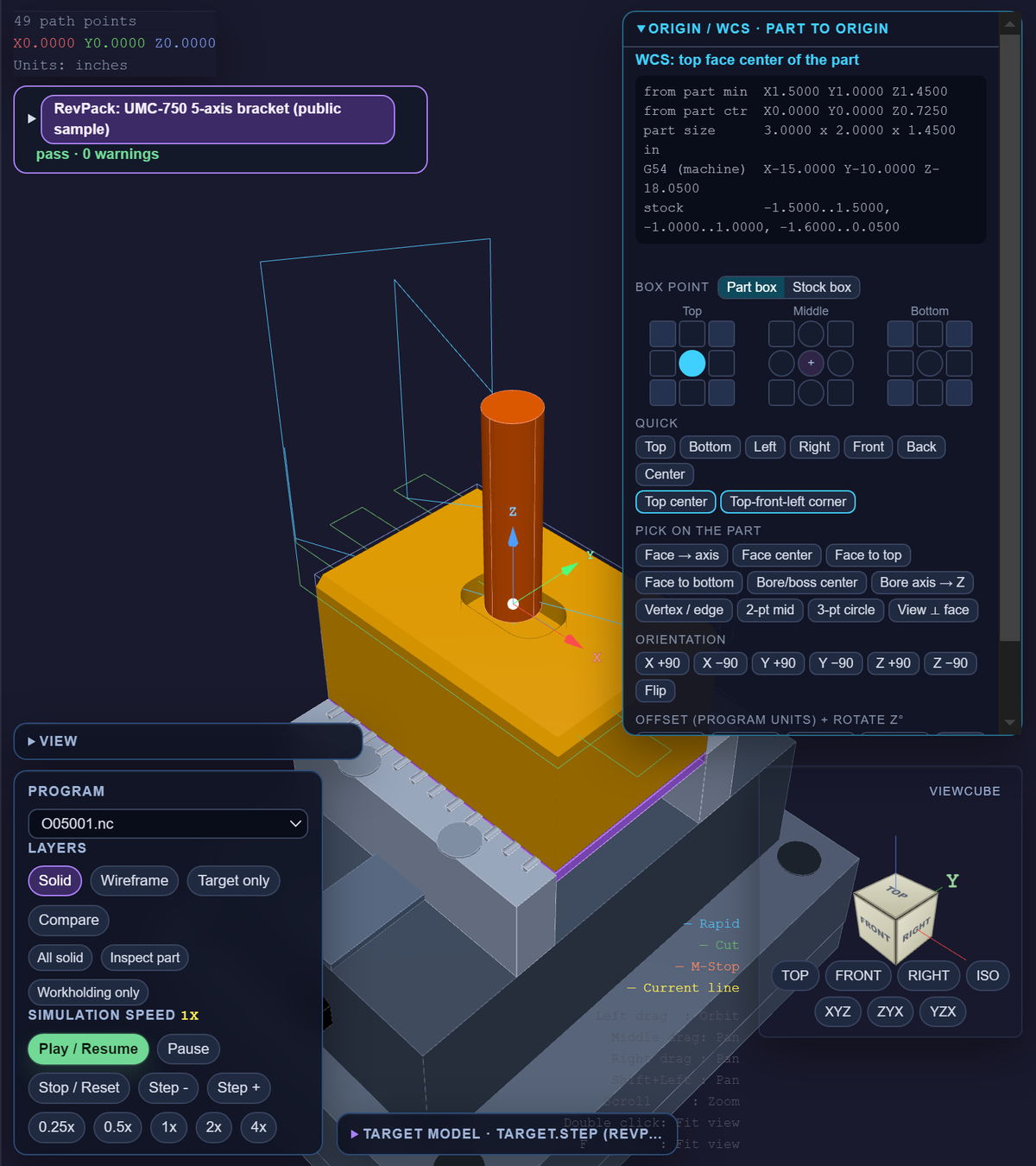
Collision and grip warnings that name the solid
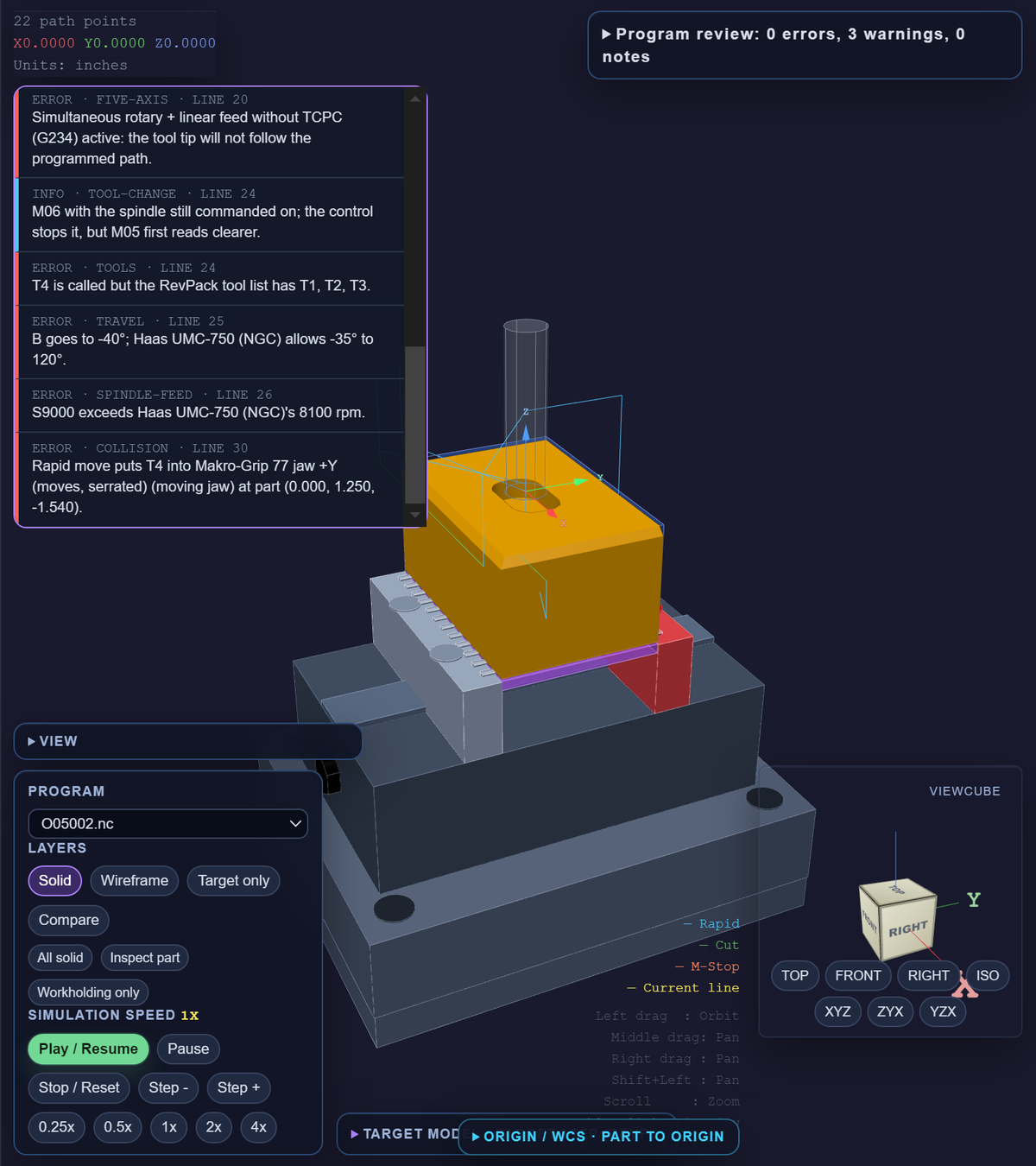
v0.3.14 · in reviewA rapid into the jaw is reported as a rapid into “Makro-Grip 77 jaw +Y”, the jaw turns red, and the finding links to the line. Feeds into the grip zone and grip depth are warned too.
Part to origin / Set WCS
v0.3.14 · in reviewPut the work origin on any of 27 box points, a face, a bore center or axis, or picked points. Rotate, offset and center the part in the stock, with a G54 readout.
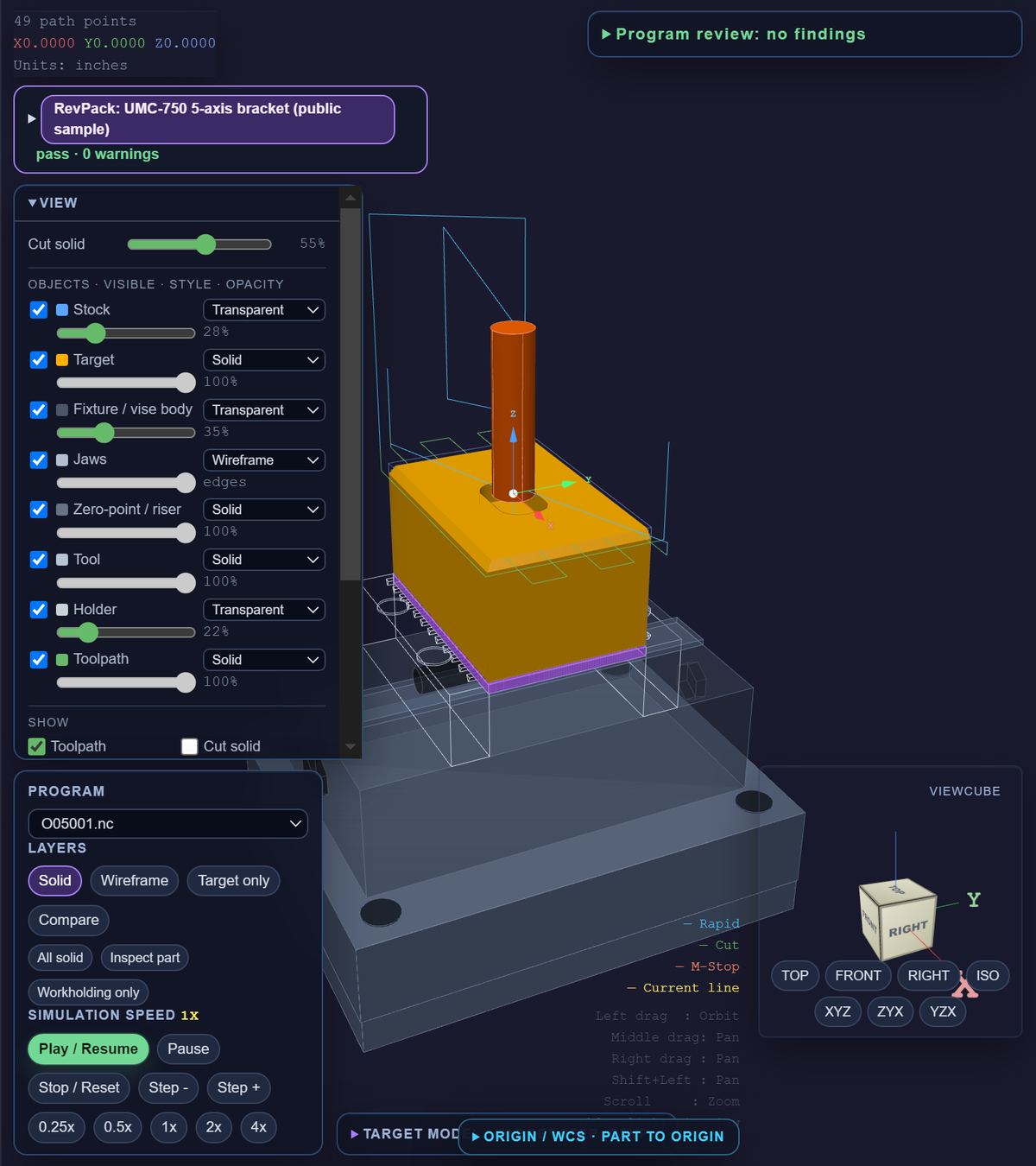
Collision and grip warnings that name the jawv0.3.14 · in review
Part to origin / Set WCSv0.3.14 · in review
Problems flagged on the line that causes them
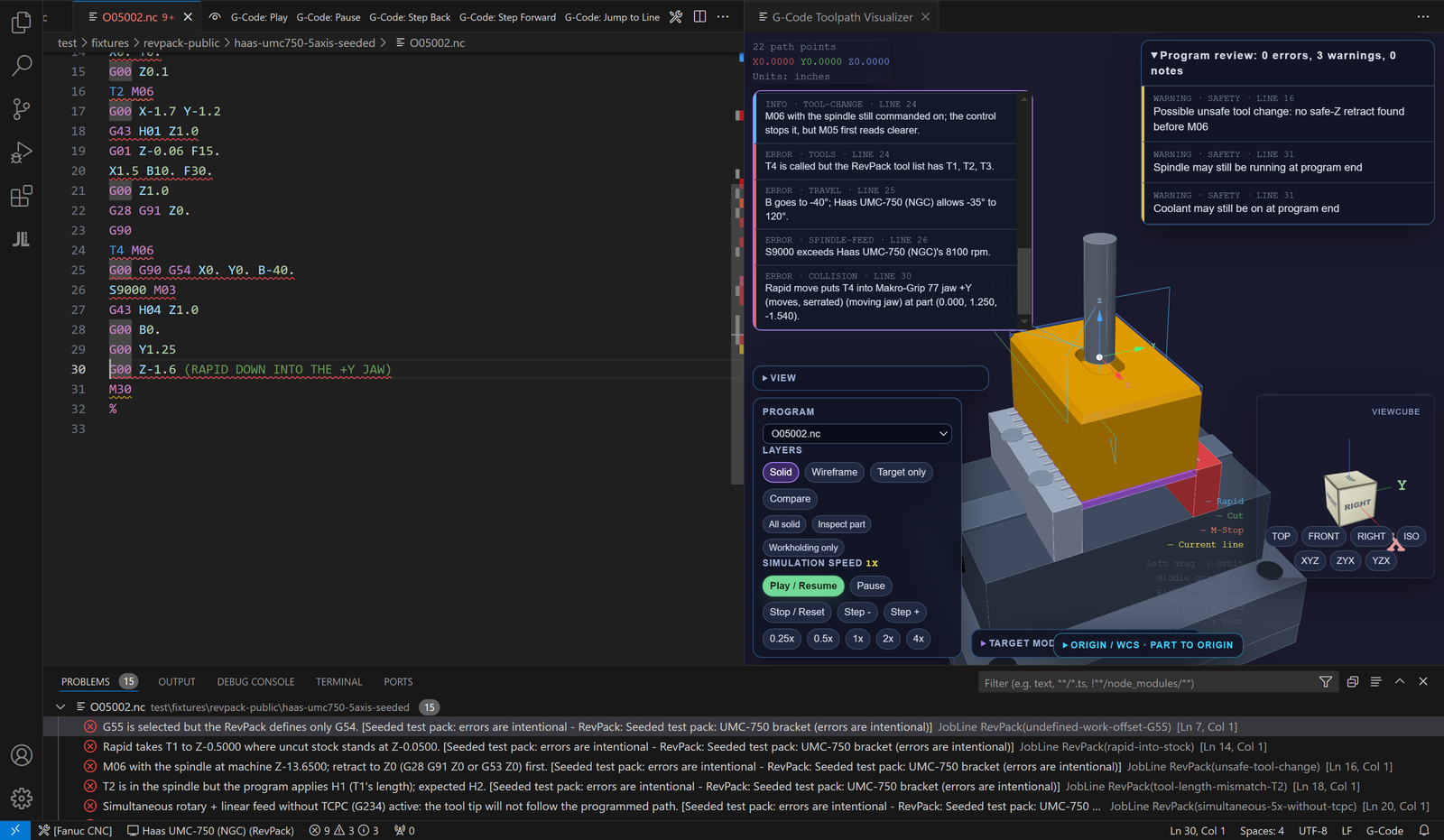
Live diagnostics underline the line as you type and list it in the Problems panel, with the reason and the fix. Click a finding to jump to it.
Warnings and errors on the line
Problems are underlined as you type and listed in VS Code's Problems panel. Validate Program re-runs every check and counts errors and warnings.
Checked against your machine
Pick a machine preset (control, travel, spindle limit, options) once. Moves past travel limits are flagged, and robot vs CNC programs are caught.
Tool, offset and setup checksv0.3.14 · in review
With a RevPack: missing tools, T/H mismatches, no length offset after a tool change, undefined work offsets, rpm over the machine or tool, codes from the wrong control.
Tap drill check
A tap with no matching tap drill earlier in the program is flagged with the right size (75%, 50% or STI), from the JobLine shop reference.
Hover explanations
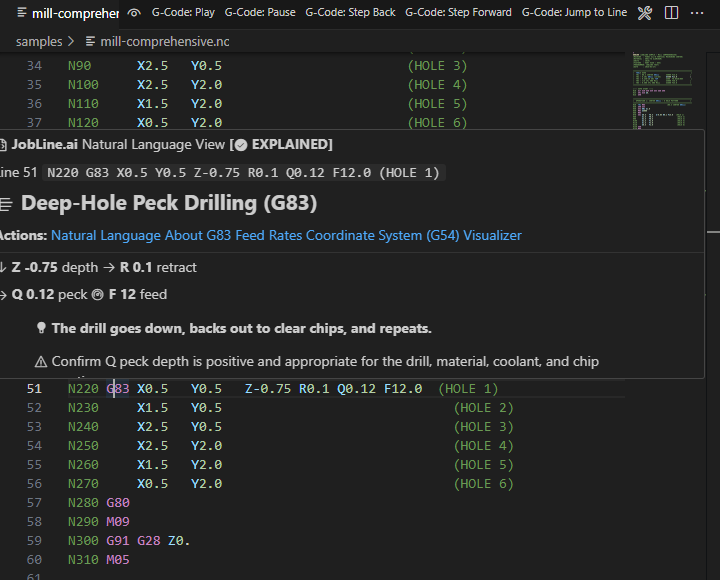
Hover any G-code, M-code or address word for a plain-language card: what it does, its parameters and what to check. Siemens CYCLE calls included.
Formatter and program sidebar
Format G-Code fixes spacing, case and decimals. The sidebar lists operations, tools, offsets, cycles, probing, macros and alarms, and jumps to each line.
Example flags
- Canned cycleCanned cycle requires R (R-plane)
- Peck cycleG83 peck cycle requires Q or I/J/K peck parameters
- Tool changePossible unsafe tool change: no safe-Z retract found before M06
- Program endSpindle may still be running at program end
- Tap drillT3 taps 1/4-20, but no tool in this program drills its tap drill: #7 (0.2010) for 75% thread
- Missing toolv0.3.14 · in reviewT4 is called but the RevPack tool list has T1, T2, T3
- T/H mismatchv0.3.14 · in reviewT2 is in the spindle but the program applies H1 (T1's length); expected H2
- Over-travelv0.3.14 · in reviewB goes to -40°; Haas UMC-750 (NGC) allows -35° to 120°
- Spindlev0.3.14 · in reviewS9000 exceeds Haas UMC-750 (NGC)'s 8100 rpm
- Collisionv0.3.14 · in reviewRapid move puts T4 into Makro-Grip 77 jaw +Y (moves, serrated) (moving jaw)
Every button, and what it does
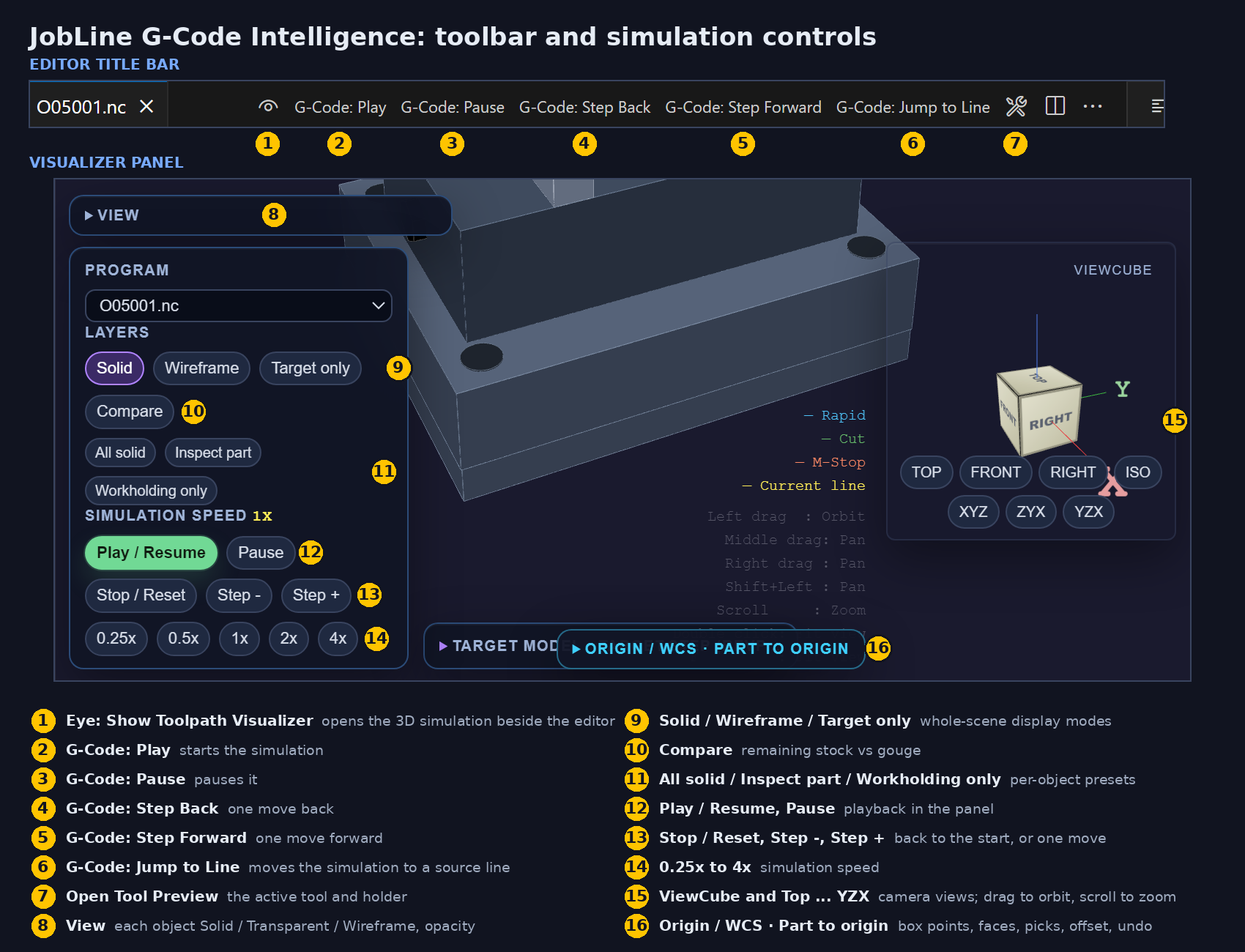
The editor title bar runs the simulation from the program; the visualizer panel holds the playback, speed, view and display controls; the Command Palette has the rest.
Editor title bar
- Eye · Show Toolpath VisualizerOpens the 3D simulation beside the editor
- G-Code: Play / PauseStarts and pauses the simulation
- G-Code: Step Back / Step ForwardMoves one move at a time
- G-Code: Jump to LineMoves the simulation to a source line number
- Open Tool Preview · Open Simulation · Full WindowTool and holder preview; the visualizer beside the editor or in its own column
Visualizer panel
- Play / Resume · Pause · Stop / Reset · Step - · Step +Playback; Stop / Reset returns to the start
- 0.25x · 0.5x · 1x · 2x · 4xSimulation speed
- Top · Front · Right · Iso · ViewCubeCamera views, with orbit, pan and zoom
- Solid · Wireframe · Target only · Comparev0.3.14 · in reviewWhole-scene display modes
- All solid · Inspect part · Workholding onlyv0.3.14 · in reviewPer-object display presets
- Origin / WCS · Part to originv0.3.14 · in reviewBox points, faces, presets, picks, rotate, offset, undo
Command Palette
- JobLine: Validate ProgramRe-checks the program and counts errors and warnings
- JobLine: Format G-CodeWord spacing, uppercase G/M codes, fixed decimals
- JobLine: Switch MachinePicks the machine preset the program is checked against
- JobLine: Load RevPack…v0.3.14 · in reviewLoads a program's machine, tools, stock and workholding
Supported CNC Dialects & Robot Languages
Five CNC dialects on one ISO / Fanuc-style engine, and two robot languages with highlighting and control checks. This is not full controller emulation.
0i/30i/31i series with full Macro B variable highlighting
NGC controls — VF, ST, UMC, UR with setting codes
Sinumerik 840D/828D with CYCLE call support
Smooth technology / Matrix (EIA/ISO mode)
OSP-P series program support
Fanuc robot teach pendant program intelligence
ABB robot RAPID language support
Part of the JobLine Platform
The G-Code extension is the program review layer at the programmer's desk. Pair it with for the shop-floor side: program transfer, machine monitoring and live status, on the same JobLine platform your supervisors and operators already use.
Why CNC Programmers Choose JobLine G-Code Intelligence
- Free — no credit card, no account required
- Runs locally — your programs are never uploaded
- 3D simulation with play, step and speed controls
- Errors flagged on the line before they reach the controller
- Tap drill check against the JobLine shop reference
- Hover docs eliminate manual-lookup time
- Machine presets for travel and spindle limits
- Live sidebar with 11 views, updated as you type
- Macro B parser with expression evaluation
- 5 CNC dialects + 2 robot languages
Free Shift Handoff Template
The one-page handoff your next shift will actually read. Excel + printable PDF.
Enter your work email to receive the free shift-handoff template. It is free, with no purchase, trial or card required. We use your address to send the file and to answer you. See our Privacy Notice.
Ready to Write Better G-Code?
Install JobLine G-Code Intelligence from the VS Code Marketplace: 3D simulation, code review with flags, hover explanations and the program sidebar, free. Runs locally; your programs are never uploaded.
ext install WeCr8-Solutions.jobline-gcodeMarketplace listing